Hello,
I am using open source BI Helical Insight Enterprise edition. I am creating an Arc chart and using two measure fields. But I am not able to apply color in the chart.
How can I apply color in this case?
Thank You,
Vema.

Hello,
I am using open source BI Helical Insight Enterprise edition. I am creating an Arc chart and using two measure fields. But I am not able to apply color in the chart.
How can I apply color in this case?
Thank You,
Vema.
Hello Vema,
Hello,
For an Arc chart, you should normally use one measure and one dimension wherein the dimension should go into color. Read this : How to create an Arc/Pie chart - Helical Insight
If you use two measures, color cannot be applied because this chart configuration is not correct.
As a workaround, you can:
• Convert one measure field into a text (dimension) field using a database function
• Apply GROUP BY on that field
• Mark the field as Discrete
• Drag this field into the Color section
Please refer to the screenshots provided for better understanding
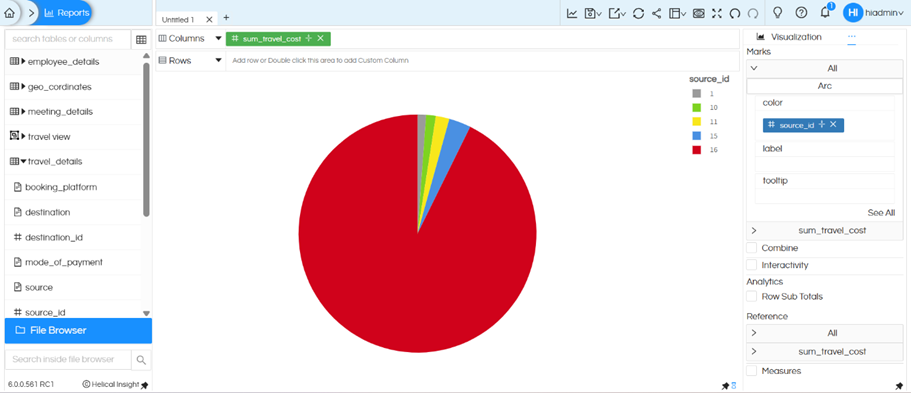
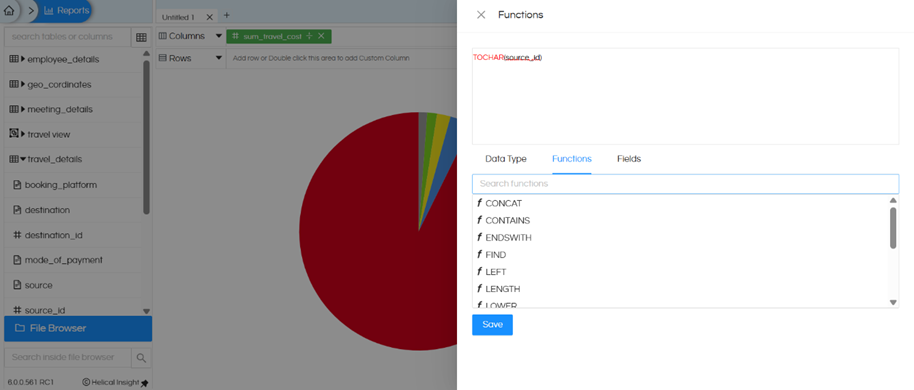
After doing this, you will be able to apply color in the Arc chart.
Thanks,
Helical Insight.