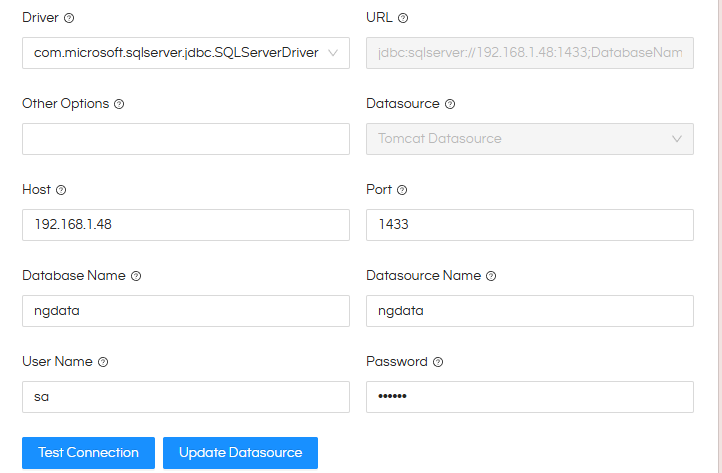
Hi @jingxiang ,
We have checked this further and found that the Docker image uses a minimized Java JDK runtime. This is done intentionally to reduce the overall Docker image size and footprint.
Because it is a minimized Java runtime, it does not contain all the modules that are included in a complete JDK installation. In this case, the jdk.charsets module is not included in the Docker runtime. This is why the SQL Server connection is failing when the SQL Server instance reports the zh_CN collation / MS936 (GBK) codepage.
This also explains the difference between your two installations. In the JAR-based installation, a complete Java JDK was installed/configured manually, so the required charset support is available there. The same datasource configuration therefore works with the JAR installation but fails with the current Docker runtime.
Our product team is currently reviewing this and we are working on the appropriate supported solution. We expect to have an update within approximately a week.
There is one additional point we would like to understand from your environment.
The same minimized Java runtime is used by many of our Docker customers, and SQL Server connections generally work successfully with it. Therefore, we would like to understand whether there is anything specific about your SQL Server environment that is causing the MS936 charset to be required.
Could you please provide the following details, if possible?
- SQL Server version
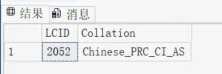
- Database/server collation
- Whether the server/database was configured with any non-default language or collation settings
- Any other specific character-set, language, or localization configuration applied to the SQL Server installation
From the logs you shared, we can see that your SQL Server is using the zh_CN Windows collation, which maps to the MS936 codepage. This appears to be the specific difference that triggers the missing charset support in the minimized Java runtime.
This information will also help us verify why the standard SQL Server configurations used by other Docker customers work with the current runtime while this particular configuration requires the additional charset module.
We will keep you updated once our product team completes the verification.
Thank you