Showing only dashboards to management users

Hello. We are using open source BI Helical Insight. We have created certain set of metadata, reports and dashboards and shared that entire folder with management users.

What is happening is that management users, when they login, they can see lot of files which is causing confusion to them. We would like them to see only the dashboards because that is what they are interested in.

How to achieve that
Hello Snow,

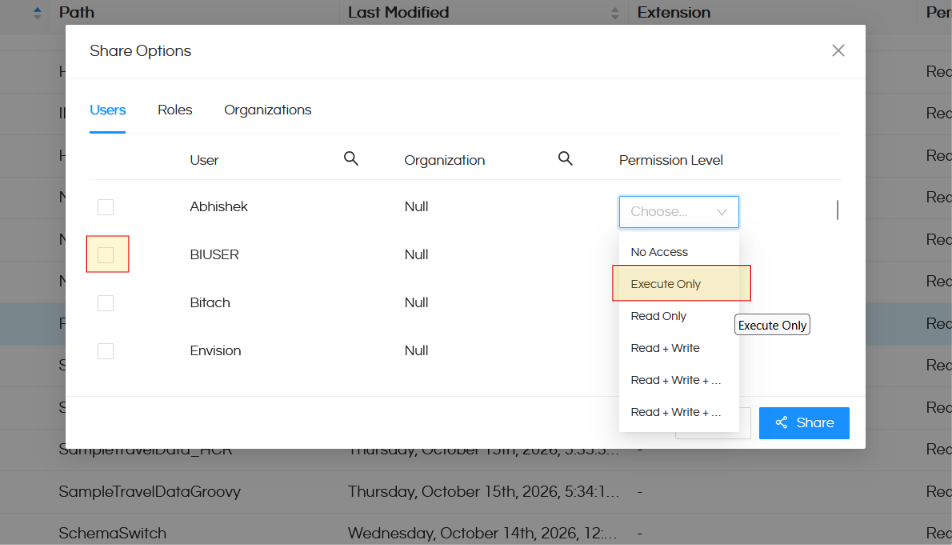
  1. As you have shared the parent folder, in which all the resources are present, in read mode, whatever content is present in the folder is visible to your management. What you can do is select those specific individual reports and metadata files, right click on them and then select “Share” option. Now in the sharing select “Execute” (you can share individually with a user or role or organization). When this is done, what will happen is that resources will not be visible in File Browser but they will still get executed. As dashboards are created from the reports and reports are created from the metadata, it is important that the management users have access to thse resources as well. Had you shared them as “No Access” then if the management users had opened the dashboard it woudl have shown " Access Denied" kind of message for all the reprots in the dashboard for which “No Access” was given.

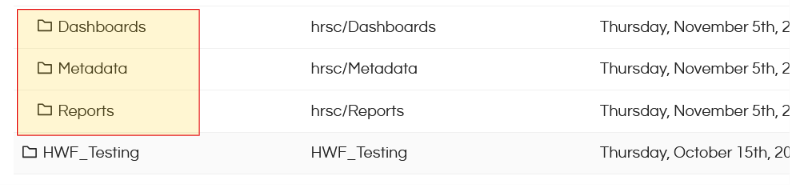
Showing only dashboards to management users 1

  1. A good practice is to NOT put all kind of same resources in the same location. You should have a separate separate folders for metadata, reports and dashboards. This way, you can simply share metadata and reports folder as “Execute” and share “Dashboards” folder as “Read Only”

Showing only dashboards to management users 2

Read this blog to learn about the various permission levels.

Also click here to learn how does the bundled sharing concept works.