Hello Netta,
Helical Insight does not provide a direct option to set a filter as mandatory. However, this can be achieved using JavaScript validation in the PostFetch operation.
Because of this approach:
• You can prevent the report from displaying data if no filter is applied
• A custom validation message can be shown to the user
• It ensures users must select at least one filter value before viewing data
You can implement this by adding a script in:
Report → Properties → Operations → PostFetch
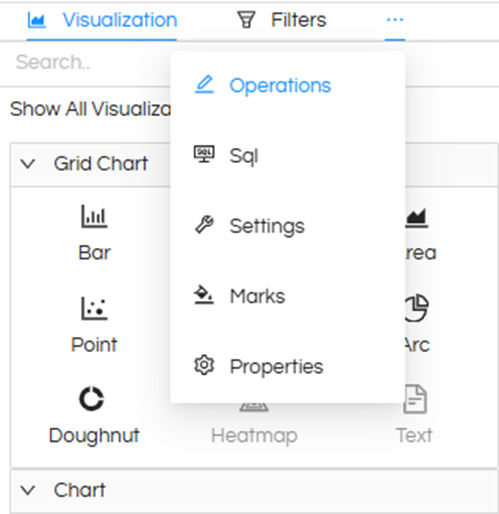
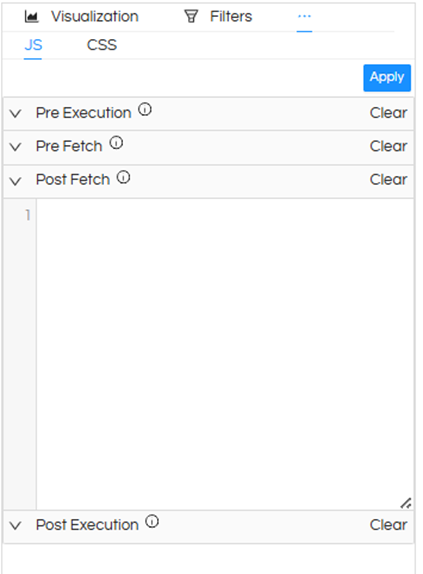
Sample Script:
if (filters && filters.length > 0) {
  const allFiltersEmpty = filters.every(filter => Array.isArray(filter.values) && filter.values.length === 0);

  if (allFiltersEmpty) {
    data = [];
    setTimeout(() => {
      document.getElementById('hi-report-41672263').innerHTML = `You must select at least one value in the filters`;
    }, 200);
  }
}
Important:
Replace the component ID (hi-report-XXXX) with your actual report ID. You can get the componentID of the report by going to CSS section in Operations.
Because of this implementation:
• The report will not load data until at least one filter value is selected
• Users will see a clear message prompting them to apply filters
• This effectively makes the filter mandatory
This is the recommended workaround in Helical Insight to enforce mandatory filters.
Thank You,
Helical Insight.
