Hello Helical Insight Team,
We are using the open-source BI tool Helical Insight version 6.1.0.694.
We want to increase the font size of table (grid) cell data in a tabular report. Can you suggest how it can be done?
Thanks,
Netta.

Hello Helical Insight Team,
We are using the open-source BI tool Helical Insight version 6.1.0.694.
We want to increase the font size of table (grid) cell data in a tabular report. Can you suggest how it can be done?
Thanks,
Netta.
Hello,
This can be achieved by applying CSS at the report level.
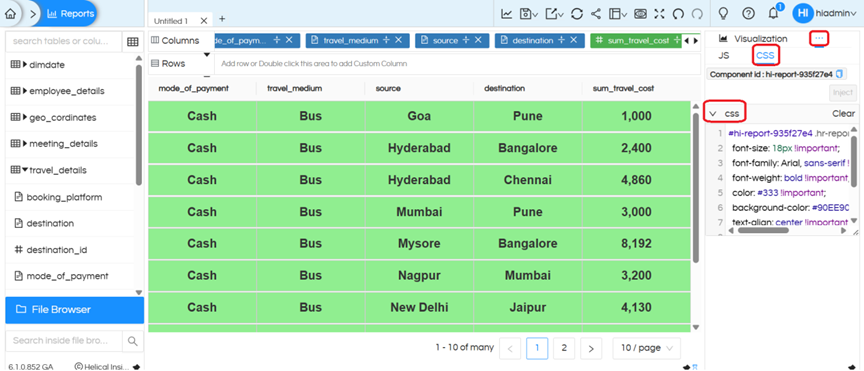
Click on the three-dot (ellipsis) menu next to Visualization > Operations > CSS
Inject* CSS in the placeholder, and click Apply
.hr-report-cell {

font-size: 18px !important;

}
To ensure the styling applies only to a particular report, prepend the component ID like shown below. You can also see the ComponentId below where CSS is written. Or browser console can also be used:
#hi-report-10cdb6f8 .hr-report-cell {

font-size: 18px !important;

}
You can also apply additional CSS properties for better formatting:
#hi-report-10cdb6f8 .hr-report-cell {

font-size: 18px !important;

font-family: Arial, sans-serif;

font-weight: bold;

color: #333;

background-color: #90EE90 !important; /* light green */

text-align: center;

padding: 8px;

border: 1px solid #ccc;

line-height: 1.5;

letter-spacing: 0.5px;

text-transform: capitalize;

}
Thank You,
Helical Insight Team.