Hello Vema,
You can achieve this using dashboard-level CSS by targeting the respective menu classes.
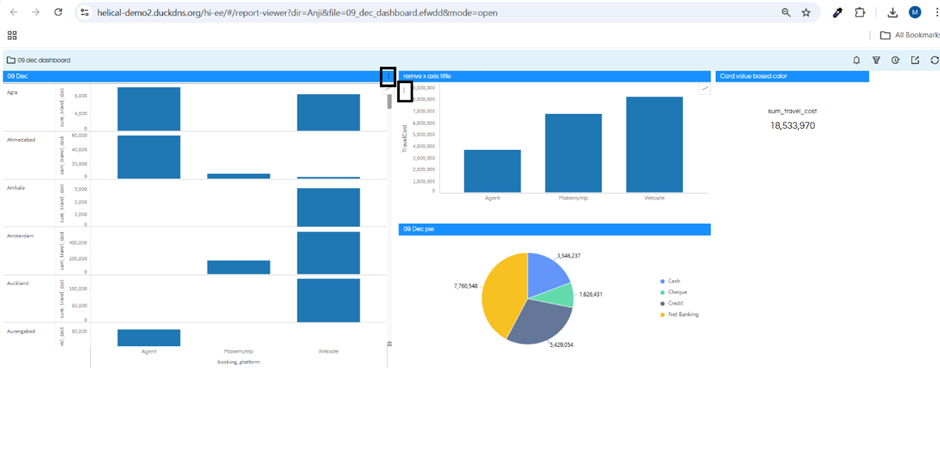
1. Hide panel-level (widget) 3-dot menu, keep top-right visible
ul.ant-menu.ant-menu-root.ant-menu-vertical.ant-menu-light.hi-grid-item-options {
display: none !important;
}
Result:
• Panel (widget) 3 dots → Hidden
• Top-right menu → Visible
2. Hide top-right 3-dot menu, keep panel-level visible
ul.ant-menu.ant-menu-root.ant-menu-vertical.ant-menu-light.hi-grid-item-open-mode-options {
display: none !important;
}
Result:
• Top-right menu → Hidden
• Panel (widget) 3 dots → Visible
3. Hide both menus (optional)
ul.ant-menu.ant-menu-root.ant-menu-vertical.ant-menu-light.hi-grid-item-options,
ul.ant-menu.ant-menu-root.ant-menu-vertical.ant-menu-light.hi-grid-item-open-mode-options {
display: none !important;
}
Result:
• All 3-dot menus → Hidden
Note:
• !important is required to override default styles
• You can append the componentid of that component also so that it affects only there
• If you would like, you can add this CSS as part of global custom CSS that you can create. Hence all across from all dashboards it will get removed.
Thanks,
Helical Insight Team.
