Hello,
We are using open source BI Helical Insight version 6.1.0.852. How can we hide specific export options in adhoc report like Microsoft PowerPoint (.pptx) and PNG Image (.png) from the export menu?
Thanks,
Netta.

Hello,
We are using open source BI Helical Insight version 6.1.0.852. How can we hide specific export options in adhoc report like Microsoft PowerPoint (.pptx) and PNG Image (.png) from the export menu?
Thanks,
Netta.
Hello,
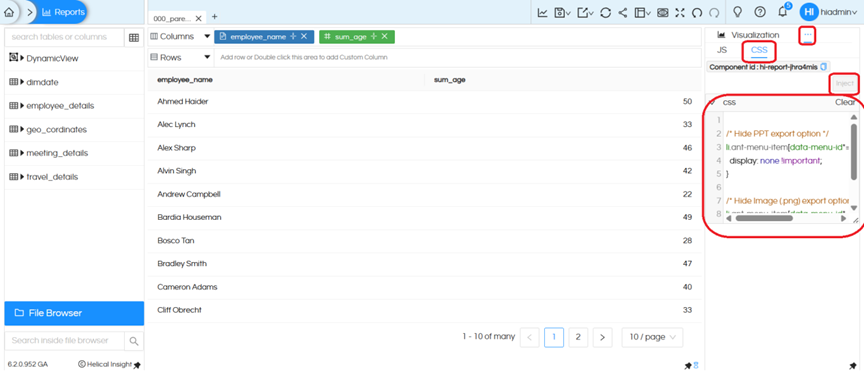
You can hide specific export options by applying custom CSS to the export menu items.
Go to Visualization → three dots → Operations → CSS, then add CSS and click on Inject
/* Hide PPT export option */
li.ant-menu-item[data-menu-id*="Microsoft PowerPoint"] {
  display: none !important;
}

/* Hide Image (.png) export option */
li.ant-menu-item[data-menu-id*="PNG Image"] {
  display: none !important;
}
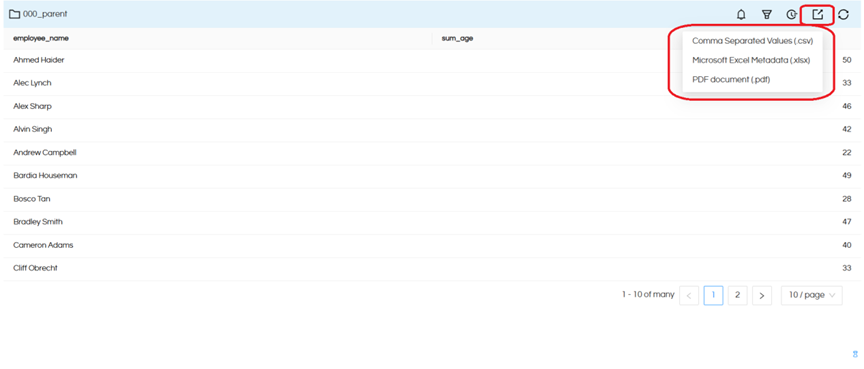
Additionally, we can hide CSV, XLSX, and PDF export options using similar CSS by targeting their menu identifiers.
/* Hide CSV export option */
li.ant-menu-item[data-menu-id*="Comma Separated Values"] {
  display: none !important;
}

/* Hide Excel export option */
li.ant-menu-item[data-menu-id*="Microsoft Excel Metadata"] {
  display: none !important;
}

/* Hide PDF export option */
li.ant-menu-item[data-menu-id*="PDF document"] {
  display: none !important;
}
Thanks,
Helical Insight.