Hello Vema,
Hello,
This issue is typically caused by improper connection pool configuration and inefficient connection validation settings.
By default, a very high pool size or incorrect validation query can lead to unstable or stale connections, which results in this error.
Solution:
You need to adjust the connection pool settings in your configuration file (such as hikari or tomcat datasource settings).
1. Reduce Connection Pool Size
Lower the maximum pool size to avoid overloading the database:
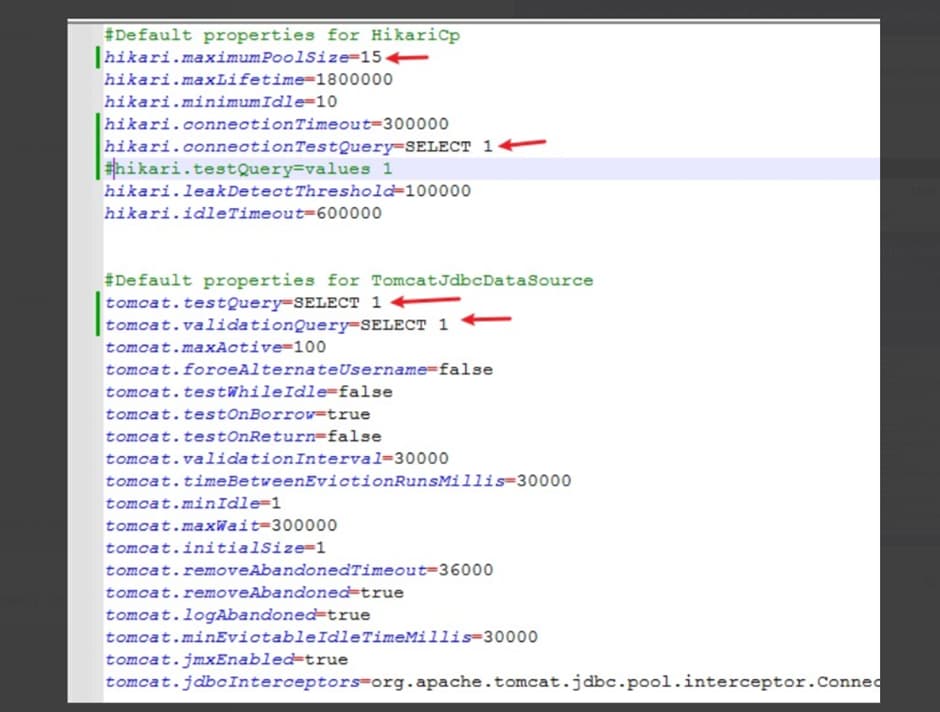
hikari.maximumPoolSize=15
(Previously it was set to 100, which was too high.)
2. Update Connection Validation Query
Ensure a lightweight and valid query is used:
hikari.connectionTestQuery=SELECT 1

OR (for Tomcat datasource):

tomcat.validationQuery=SELECT 1
tomcat.testQuery=SELECT 1
Why this works:
- Reducing pool size prevents excessive open connections
- A simple validation query ensures connections are alive without overhead
- Helps avoid stale or broken connections in the pool
Final Step:
Restart the Helical Insight server/service after making these changes.
Result:
After applying the above fixes, the connection validation error should stop occurring, and the system will behave more reliably.
Thank You,
Helical Insight.

